
Download NetSpot Pro – Wi‑Fi Analyzer, Troubleshooter & Optimization Tool
Overview
NetSpot Pro is the premium version of the well‑known Wi‑Fi analysis suite designed exclusively for macOS. It gives both casual users and IT professionals a powerful, visual way to map, diagnose, and improve wireless networks. Whether you’re setting up a home office, managing a multi‑floor office building, or just hunting for the strongest café hotspot, NetSpot Pro turns the invisible radio spectrum into an intuitive heatmap that tells you exactly where the signal is strongest, where interference lurks, and how to optimize your AP placement.
The Pro edition adds real‑time data collection, live channel‑interference charts, and a built‑in troubleshooting wizard that automatically flags weak‑signal zones, overlapping channels, and mis‑configured routers. Because the software runs natively on macOS, it leverages Apple’s graphics stack for smooth 3‑D visualizations and integrates with macOS security features to keep your network data secure. In short, NetSpot Pro removes the guesswork from Wi‑Fi planning, helping users achieve the fastest, most reliable connection possible without the need for expensive hardware probes.
Key Features That Set NetSpot Pro Apart
- Live Wi‑Fi Scanning: Capture signal strength, channel usage, and noise levels in real time as you move through a space.
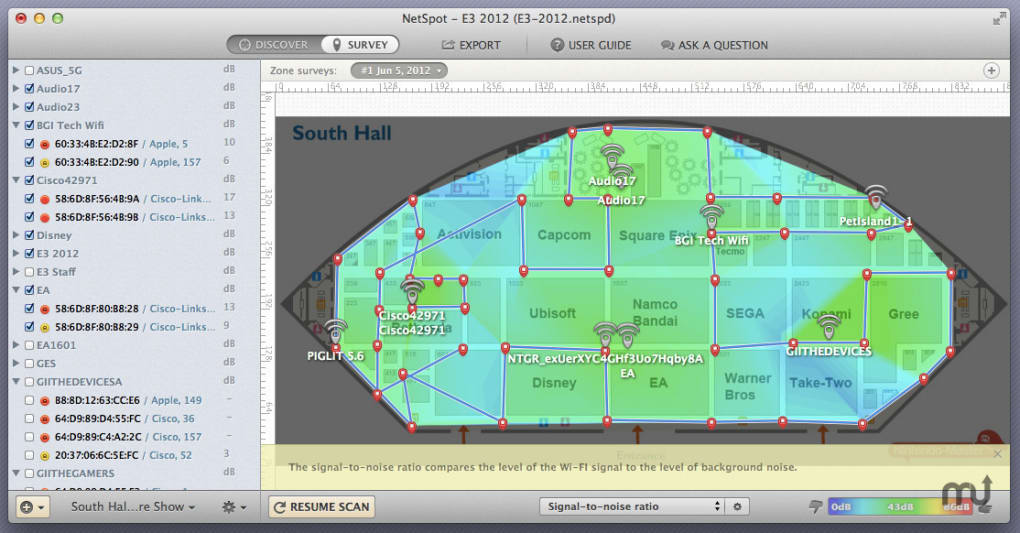
- 3‑D Heatmap Generation: Visualize signal distribution on floor plans or 3‑D building models for quick identification of dead zones.
- Channel Interference Charts: Real‑time graphs show overlapping channels and help you select the cleanest frequencies.
- Automated Troubleshooting Wizard: The tool analyses collected data and suggests concrete actions, such as relocating APs or changing channel settings.
- Multi‑Floor Support: Import multiple floor plans and switch between them seamlessly, making it ideal for large offices or campuses.
- Exportable Reports: Generate PDF or CSV reports with annotated heatmaps, ready for stakeholder presentations.
- Secure Data Handling: All scan data is stored locally on your Mac, encrypted with macOS FileVault, ensuring privacy.
- Regular Updates: Free updates keep the software compatible with the latest macOS releases and Wi‑Fi standards (including Wi‑Fi 6E).
Each feature has been engineered with a focus on ease‑of‑use. For instance, the Live Scanning mode updates the heatmap every few seconds, allowing you to walk around with your MacBook and instantly see how the signal changes. The Channel Interference charts use color‑coded bars that make it obvious which channels are overcrowded. Meanwhile, the Troubleshooting Wizard reduces the learning curve for non‑technical users by providing step‑by‑step guidance, from adjusting router power levels to recommending optimal antenna placement. The combination of visual analytics and actionable recommendations makes NetSpot Pro a truly comprehensive Wi‑Fi management solution for macOS.
Installation, Usage & Compatibility
Installing NetSpot Pro on a Mac is straightforward. After purchasing the license, you receive a direct download link. Click the link to download the .dmg installer, then drag the NetSpot icon into your Applications folder. macOS may prompt you to confirm that you trust the developer; simply click “Open” to continue. The first launch will ask for permission to access your location and Wi‑Fi hardware – these are required for accurate scanning and are handled securely by the operating system.
Once installed, launching NetSpot Pro presents a clean dashboard with three primary modes: Discover, Survey, and Analyze. In Discover mode, the app automatically scans all visible networks, displaying SSIDs, signal strength, channel, and security type. Survey mode is where the heatmap magic happens – you import a floor plan (PDF, PNG, or JPEG), calibrate the scale, and start a live survey. As you walk through the area with your MacBook, NetSpot plots each measurement point onto the map, creating a dynamic heatmap. When you finish, you can switch to Analyze to view detailed charts, run the Troubleshooting Wizard, and export your findings.
Compatibility: NetSpot Pro is built exclusively for macOS 10.14 (Mojave) and later. It runs natively on Intel‑based Macs as well as Apple Silicon (M1, M2) devices, thanks to Apple’s Rosetta 2 translation when necessary. Unfortunately, Windows, Linux, Android, and iOS versions are not available at this time, so users on those platforms will need to look for alternative Wi‑Fi mapping tools.
System requirements are modest: a Mac with at least 4 GB RAM, 200 MB of free disk space for the application, and a Wi‑Fi adapter that supports 2.4 GHz and 5 GHz bands (most modern Macs do). For optimal performance in large‑scale surveys, a Mac with 8 GB RAM or more is recommended, especially when handling multi‑floor 3‑D models.
Pros, Cons, FAQ & Final Verdict
Pros
- Intuitive, visually‑rich heatmaps make Wi‑Fi analysis accessible to non‑technical users.
- Live scanning and real‑time charts provide immediate feedback during site surveys.
- Comprehensive troubleshooting wizard reduces the time spent on trial‑and‑error.
- Supports both Intel and Apple Silicon Macs, ensuring future‑proof compatibility.
- Secure, local storage of survey data respects user privacy.
- Exportable, professional‑grade reports are ideal for business presentations.
Cons
- Limited to macOS; no Windows or mobile version, restricting cross‑platform use.
- Higher price point compared to basic Wi‑Fi scanners, though justified by advanced features.
- Requires a MacBook or iMac during surveys; a dedicated Wi‑Fi dongle may be needed for older hardware.
Frequently Asked Questions
Can NetSpot Pro work with external Wi‑Fi adapters?
Yes. While the built‑in Wi‑Fi of most Macs is sufficient, NetSpot Pro can also use compatible external adapters that support monitor mode. This is useful for older Macs with limited band support.
How often does NetSpot Pro receive updates?
Subscribers receive free updates for one year after purchase, including new macOS compatibility patches and feature enhancements such as support for Wi‑Fi 6E.
Is my survey data encrypted?
All survey files are stored locally on your Mac and are encrypted by macOS FileVault if you have it enabled, ensuring that sensitive network information remains private.
Can I import custom floor plans?
Absolutely. NetSpot Pro accepts PDF, PNG, JPEG, and even DXF files for detailed architectural drawings, allowing precise scaling and alignment.
Do I need an internet connection to run a survey?
No. NetSpot Pro performs all scanning and analysis locally. An internet connection is only required for license activation and software updates.
Conclusion & Call to Action
NetSpot Pro stands out as the most polished Wi‑Fi analysis tool available for macOS. Its blend of live data capture, rich visualizations, and an intelligent troubleshooting assistant makes it indispensable for anyone who needs reliable wireless performance—from home users to enterprise IT teams. While the lack of Windows support may be a drawback for mixed‑environment organizations, the depth of features and the seamless macOS integration more than compensate for that limitation. If you’re serious about eliminating dead zones, optimizing channel allocation, and producing professional reports, investing in NetSpot Pro is a smart move.
Ready to boost your Wi‑Fi confidence? Download NetSpot Pro today, start a free trial, and experience the difference of data‑driven wireless management.







